Hey everybody! Bjork here. I’m known as “Lindsay’s husband” ’round these parts.
A fun fact to start things off: Today’s post marks one year since Lindsay and I first started to experiment with creating an income from her blog. The August total from that first income report was $21.97! Kind of unbelievable. You can check out that first post here.
My hope for these monthly reports is that you will learn at least one thing that will help your blog grow.
First, the numbers.
The Breakdown:
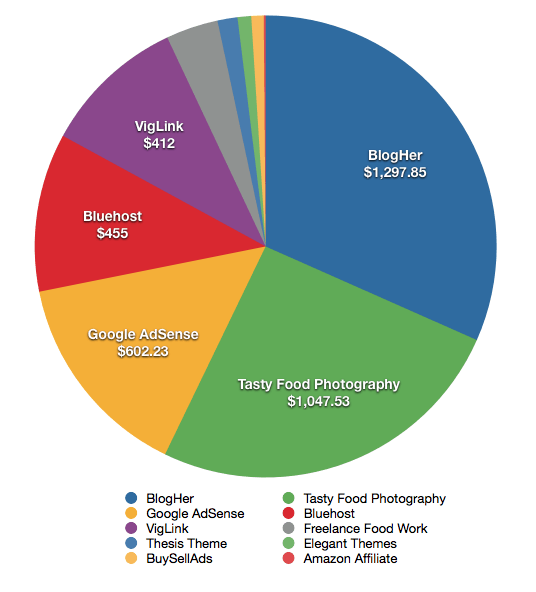
- BlogHer – $1,297.85
- Tasty Food Photography – $1,047.53
- Google AdSense – $602.23
- Bluehost – $455
- VigLink – $412
- Freelance Food Work – $150
- Thesis Theme – $57.42
- Elegant Themes – $39
- BuySellAds – $35.50
- Amazon Affiliate – $5.63
Grand Total: $4,102.16
If you’re interested in learning more about some of the ways that you can monetize a food blog, we encourage you to download this free ebook, “16 Ways to Monetize Your Food Blog,” from our sister site, Food Blogger Pro!
A few notes on the income report above.
The BlogHer income is higher than usually as we experimented with some different types of sponsored ads. We were both a bit hesitant, but we liked the brand (Odwalla), so we decided to give it a try just to see what it was like. As a reader of Pinch of Yum, I’m curious what your thoughts are on sponsored posts. We’d love to have you share in the comments section below.
Also, you’ll notice a new item in the list called BuySellAds. BuySellAds is an advertising marketplace. After getting accepted you can list an ad space on your site and advertisers can purchase the ad spot at the price you set. You can check out Pinch of Yum’s BuySellAds page if you’re curious as to what it looks like.
Speaking of advertising…
We’ve put together what I think to be the best advertising setup we’ve had so far on Pinch of Yum. Here’s a video of how we have the advertising setup right now. The video includes information on how we are backfilling the BlogHer and BuySellAds ad spots.
Traffic
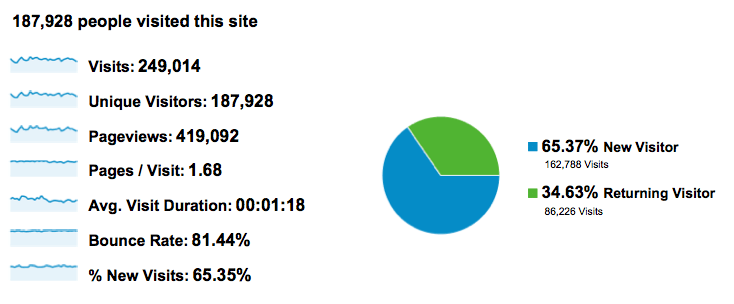
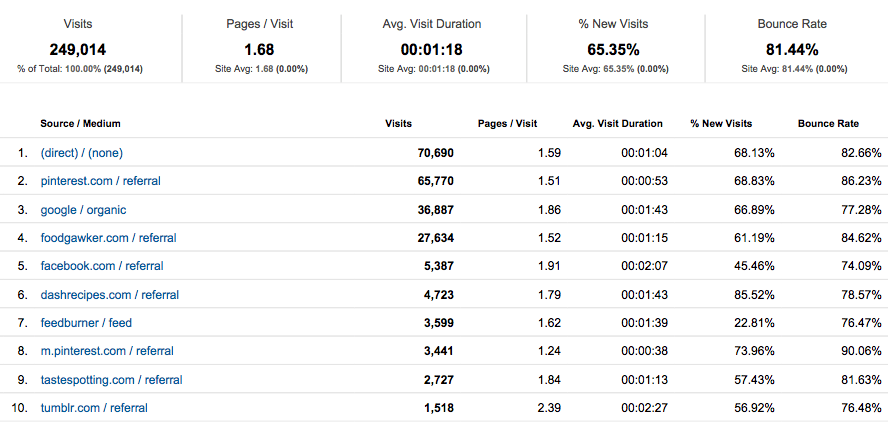
Here are the screenshots of the Pinch of Yum Google Analytics for the month of August.
Tips and Takeaways
Google Analytics
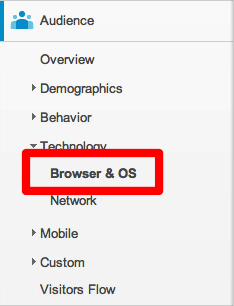
Next time you’re checking Google Analytics look at the Browser and OS category. This will show you the most popular browsers that people are using to view your blog.
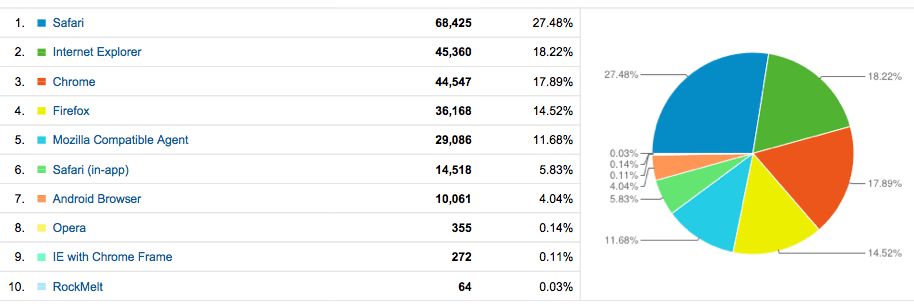
Every browser will render your blog a little bit differently (color, size, spacing…), so be sure to always check to see what your most recent post looks like for the top used browsers. As you can see, the most popular browser for Pinch of Yum readers is Safari. Although I personally use Chrome, I do my best to use Safari occasional to check and make sure that everything looks okay.
Clean Pinning
On the majority of Pinch of Yum posts we include this little “Pin It” button that I created:

This button is a little bit different than the button at the end of a post because it allows the reader to pick which image they want to pin. The only problem was that whenever it was clicked every single image on the page was showing up as an option to pin.
The solution?
This code: nopin = “nopin”
If you ever have an image that you don’t want be pinned, for instance, something in your sidebar, then just add the above code to your image’s HTML code. Here’s a quick video showing you how to do that.
Google Authorship Image
Have you setup your Google Authorship Image yet? If you haven’t, I’d suggest doing so.
I don’t really have any hard evidence on this one, but I’d bet a freshly picked mango that people are more likely to click on a link that has someone’s face associated with it.
Here’s an example from when I googled Smores Bars:
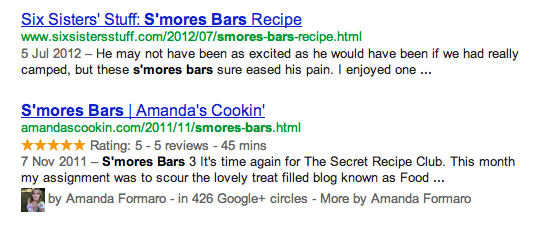
I’m not sure who Amanda is, but I would imagine that seeing her picture underneath the link would make my subconscious brain a little bit more likely to click her link.
Here’s the easy step-by-step.
- Open a Google+ account (if you haven’t already).
- In Google+, add your blog URL in the “contributes to” section.
- Install the Google+ Author plugin (or one like it).
- In the WordPress backend, add your Google+ URL.
Thanks!
Each month I have a list of about 300 things that I want to share with you. Even when I cut my list down and only post about a few things, it can start to get wordy! Thanks for reading all the way through – I hope you found it interesting and maybe even helpful.
If you have any questions, feel free to leave them in the comments or shoot me an email – bjork (at) pinchofyum (dot) com.


Bjork, your income report is invaluable! Thank you for taking the time to share your knowledge with your fellow bloggers, particularly us the newbies!
Haha! OMG someone shared a link to your series in a Facebook group I’m in. So I have been reading through all of the posts, oldest first, and learning quite a bit. But I totally had to laugh just now when I saw MY S’mores bar recipe and my picture (in the Google authorship section) along with your comment saying “I don’t know who Amanda is…” So funny, and thank you so much for the informative posts. Really enjoying them! 🙂
Oh my gosh too funny! 🙂 Small world!
Actually I have to thank you guys for including that screenshot. It made me realize that when I turned off the Easy Recipe plugin and switched to ZipList that I lost my page rank on that recipe. I had started going through and editing my older recipes and updating them to ZipList, but got sidetracked and never went back to it. It’s back on my to do list, so thank you! 😉
buy propecia germany – propecia fetus
I’m new to your blog and enjoying reading these income reports. When did you switch from the 300 x 600 BlogHer ad to using two of the skyscrapers? Has this change helped at all? Also do you know if BlogHer can take backup ad code for two ads? Thanks!
I’m curious about adding google adwords to my blog. Which plugin do you use with WordPress? I know it supposedly works seamlessly with blogger, but not with wordpress?
Bjork,
I am curious when you guys are going to put all these awesome recipes in a cook book format for me? ahem, I mean everyone? We pass your blog around our office quite often and have even adapted recipes to use in our Cafeteria, which is fun cause whenever someone asks for a recipe I can send them to your site. I know it’s a ton of work, but just an idea. I know of a few ladies who would buy it for sure!
Hey!
Did you have to add shortcode to your page for the Google Authorship Plugin? I followed the instructions in the video, but it didn’t work. The Plugin instructions say to add shortcode, but I don’t know where to put it, and thought you might have some insight? I use Thesis.
Thanks for sharing this valuable info!
Thank you for all of this, I’ll be looking at other similar posts here. I never thought my little hobby had the potential of earning money, I’m still under $1/month (if that!) but I do get free food 🙂 For me it’s about having fun playing with food, and sharing it with anyone who wants to read about it!
Cheers!
This is such a great resource for entry- level food bloggers like me. I found myself referring to your tips often as I set up my site and am sure I will continue to as I fine tune. Thanks!
Hi Bjork & Lindsay!
I just came across your site from creating a google alert of “photo submissions” and I feel like finding your blog is like winning the blog lottery. I just started a blog a week ago and I’m going to use your advice to create some of my own blogging success. Keep up the amazing content and information! Would love to hear any feedback you have about my blog – hope you can check it out sometime 🙂
Bjork! Would love for you guys to give a breakdown on the best way to use Google AdSense. I keep trying to use it but don’t think I’m getting the full potential out of it. 🙂
Man, I can’t tell you how informative this all is. You all are amazing for sharing. I was talking to a friend this weekend about starting a food blog and she pointed us your way. Best thing she has ever done for us. Now I may actually have to do more cooking for her. Ugh. Great stuff guys. I will do the same when I get one up and running. I’ll try to pay it forward too. 🙂
Such great info THANK YOU!
These posts are always incredibly helpful. Thank you!
Strange. My wife also has a food blog, and also has BlogHer ad, almost on the same position. Pageviews is about 8 times less, but revenue from BlogHer is 20 times less.
What could it be?
I look forward to this post every month… this one in particular is my fave! You are so awesome for sharing all of these things. I’ve always loved your pin it button and I just entered it into my site on a post. 🙂 I also figured out how to get it to remove photos from my widget area. One thing though, how might I go about removing any images I don’t want to be pinned within that post? Like my “You may also like” photos? Or should I just forget about it?
Thanks again.. you and Lindsay are the most awesomest ever!! 🙂
This is so helpful. Thanks for being open to share your tips.
Thank you for sharing, very helpful!
I just found your blog through your January income report. This is quite an improvement and very inspiring. I just started my blog so I haven’t made anything from advertising yet, but this gives me a little hope!
Please forgive my oops. I have no idea why my former comment has a link. If this is a problem I apologize.
Bjork…both of you guys are truly an inspiration. I appreciate the info you are willing to provide to assist amateurs like me to try to get to your level.
Bjork, this is SO SO SO helpful. Thank you so much! I’ve been wanting to block images on interest for ages but never knew how. I also have been obsessed with that little pin it button you guys use! I am so thankful. I love these posts. They are so very helpful.
Your teaching skills really shine through! Very informative and easy to understand. I’ve been spending months trying to understand this blogging stuff. I’m glad your blog is doing soo good, you deserve it.
Thanks for the great info 🙂
Thanks so much for sharing all of this information! I’m just starting out, and it would have probably taken me years to figure all of this stuff out.